

EDI setup
Module: EDI · For: Carrier users · Page address: /carrier-portal/edi-dashboard/setup
How to get there
Section titled “How to get there”EDI Dashboard → Setup & Automation → Configuration
Who can use this page
Section titled “Who can use this page”Needs: View permission on the EDI module.
| Seat | Can open it |
|---|---|
| Owner / Admin | Yes |
| Manager | Yes |
| User | Yes |
Actions on this page and the permission each needs
Section titled “Actions on this page and the permission each needs”| Action | Permission | Notes |
|---|---|---|
| Add matching | Create on EDI | Manage also grants it |
What this page tells you
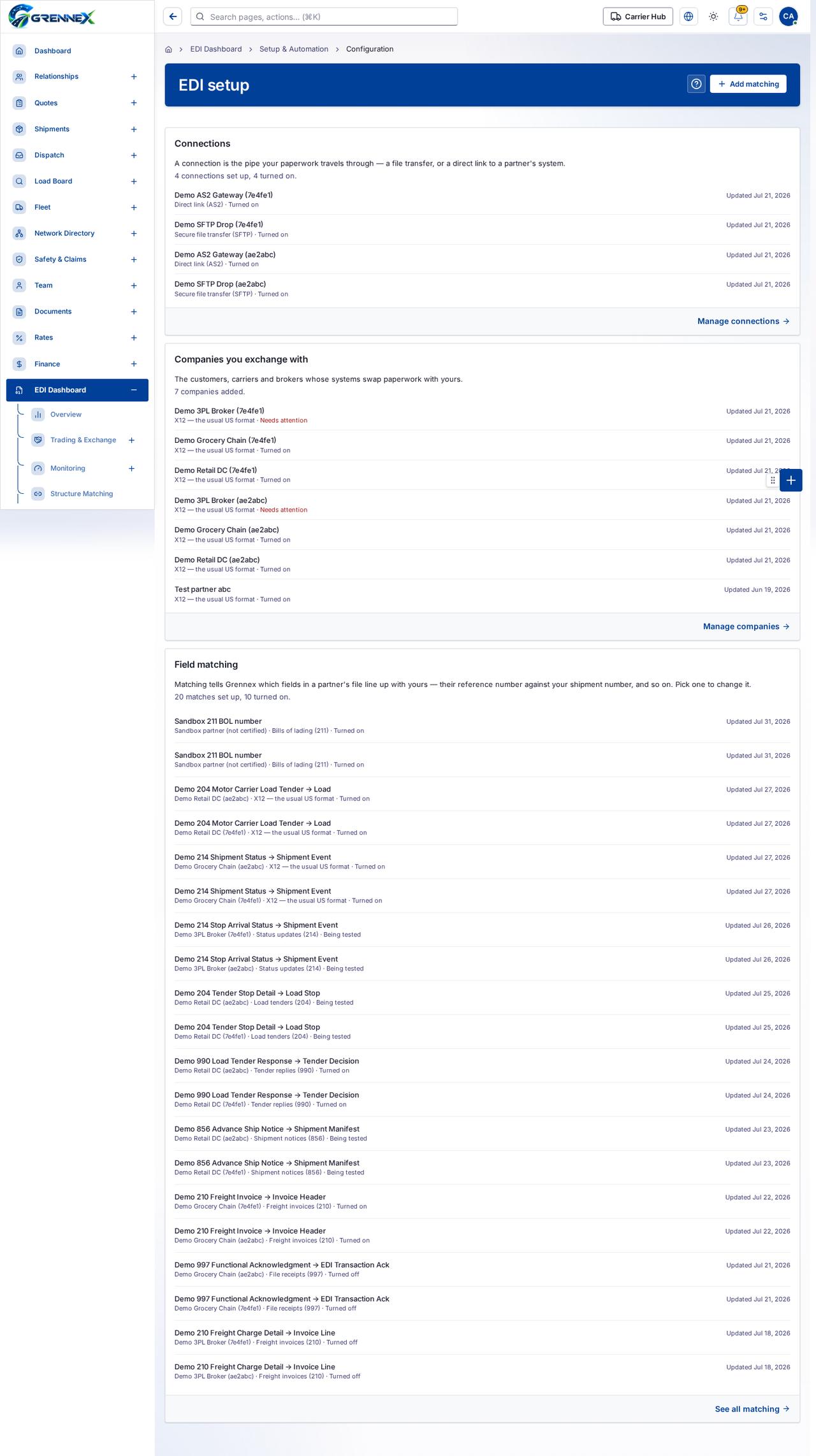
Section titled “What this page tells you”A connection is the pipe your paperwork travels through — a file transfer, or a direct link to a partner’s system. The customers, carriers and brokers whose systems swap paperwork with yours. X12 — the usual US format · Needs attention
What you see
Section titled “What you see”- Connections
- Companies you exchange with
- Field matching
What you can do
Section titled “What you can do”- How this works
- Add matching
Loading, empty and error states
Section titled “Loading, empty and error states”Loading state
Tooltip state
Last updated 2026-10-27